

Does a Modem Affect Internet Speed?
Introduction
You’re paying for high-speed internet, but are you getting it? If your connection seems slow, the question may cross your mind: Does a modem affect internet speed? The short answer is yes. Your modem is the gateway to the internet, and if it’s outdated or simply not working properly, it can easily limit your entire home network.
Table of Contents
What Is a Modem and How Does It Affect Internet Speed?
Now, before we get deep in the mud about speed problems, let’s discuss what a modem does. The Age of the Modem What is a modem (short for modulator-demodulator)? A modem, by definition, is a combined device that serves as both a modulator and[ ] It’s like a digital interpreter.
Your I.S.P. sends you the data signals through cables (or, in some cases, over fiber optic lines or radio waves) — and your computer does not speak those codes directly. Your modem receives these signals, then “demodulates” them into data your devices can understand. And in reverse when you send data, a modem “modulates” the digital data back into a signal that travels over cable lines to the internet (uploading a picture, for example).
How are you going to access the internet without a modem. It’s the all-important gateway between the web at large and your personal devices. Although many contemporary designs integrate a modem and router into one box (a “gateway”), the modem — which we often still call by its dial-up-era acronym, even if it now connects to the internet via fiber-optic cable or phone line — remains an essential link in getting our devices online.

How Internet Speed Works (And Where Modems Limit Speed)
Understanding internet speed also helps us track down where things might be breaking down. Speed is usually described in Megabits per second (Mbps) or Gigabits per second (Gbps). This number is known as bandwidth, the highest amount of data that can pass through your connection at any given time.
Think of your internet connection like a highway.
- Bandwidth is the number of lanes on the highway. More lanes mean more cars (data) can travel at once.
- Speed is how fast those cars are moving.
- Latency (Ping) is the time it takes for a car to drive to a destination and return.
Several factors influence the speed you actually experience:
- Your ISP Plan: This is the speed limit set by your provider. You can’t go faster than the plan you pay for.
- Network Congestion: Just like rush hour traffic, if everyone in your neighborhood is online at once, speeds can drop.
- Hardware Limitations: This is where modem vs router speed comes into play. If your hardware is older than the technology your ISP uses, it acts like a narrow toll booth on a wide highway, slowing everything down.

Does a Modem Affect Internet Speed?
Does a modem affect internet speed directly, then? Absolutely. Your ISP decides how fast the service you subscribe to flows into your home, but your modem determines how much of that internet speed actually makes it to your devices.
Say you’ve signed up for one of those Gigabit plans (1,000 Mbps), but your ancient modem doesn’t support speeds faster than 100 Mbps — then guess what: You’ll never get more than 100 Mbps of speed. You’re writing a check for the Ferrari and you’re driving it on a dirt road.
The relationship works like this:
- The ISP sends the signal.
- The modem receives and translates it.
- The router distributes it.
The modem becomes the bottleneck if it can’t move the signal quickly enough. This happens often when people upgrade their internet plan but neglect to upgrade their equipment. 7. Old Modem Slow Internet The problem with old modems that make the internet connection slow is either the hardware can’t process it or doesn’t adhere to the required technology standard it needs to adapt to these faster speeds.
Additionally, modems have channels with which they talk to ISPs. The more channels the better, allowing for smoother and faster data trafficking. If your modem has fewer channels, it can get overwhelmed when there are a lot of people using the internet at once — creating lag and buffering even if your plan is fast.
For a deeper dive into how this equipment interacts, you can read more about how modems and routers affect speed.
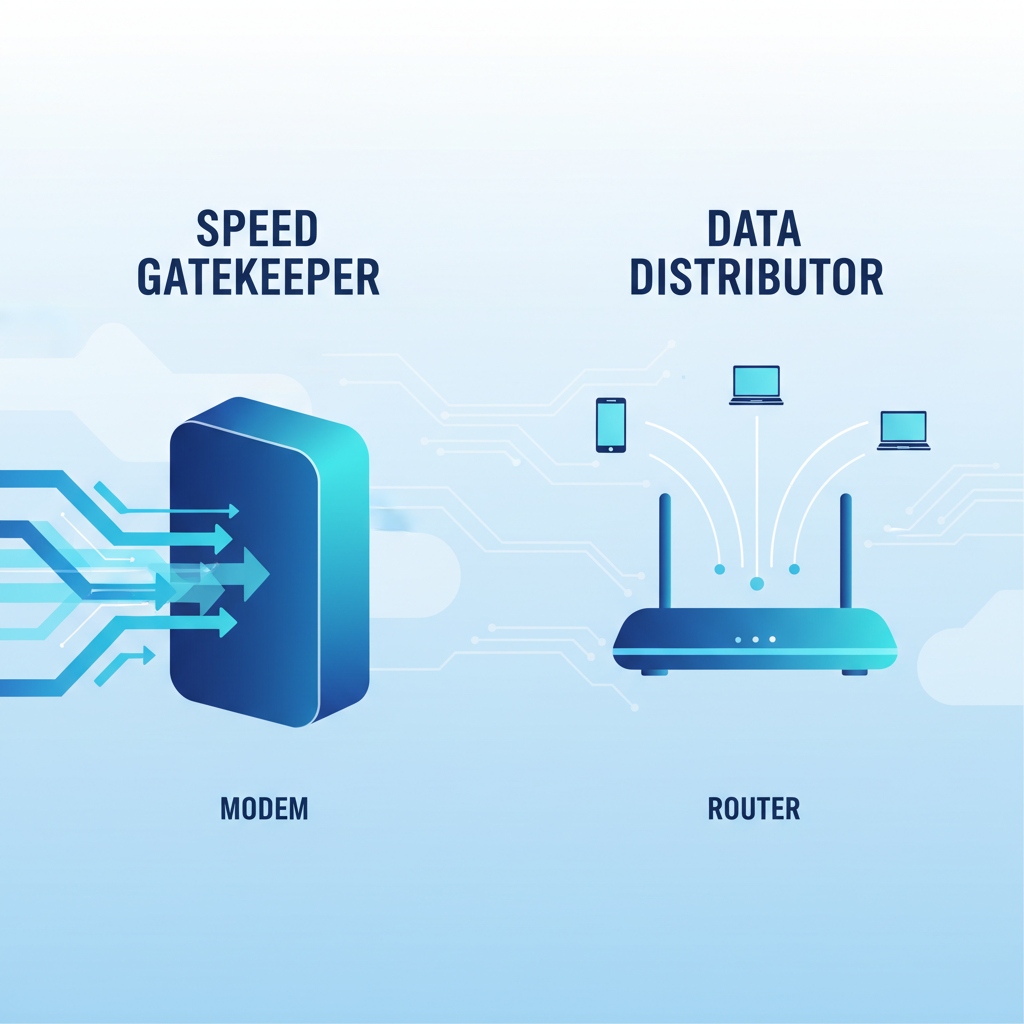
Modem vs Router: Which Affects Internet Speed More?
Many people confuse the roles of a modem and a router, but understanding the difference is crucial when diagnosing slow internet speeds.
The Modem’s Role (Sets the Speed Limit)
The modem determines the fastest speed your home can get from your ISP. It converts the signal from your ISP into usable data for your network. If your modem is old, doesn’t work well with your ISP or it’s just limited by the technology on hand, you aren’t going to be able to easily replace it if it dies even if you’re paying for less speed than the device can handle.
If you subscribe to 1 Gbps internet, and your modem is only rated up to 300 Mbps, then you’ll never benefit from the full speed. In this situation the modem is the bottleneck.
The Router’s Role (Distributes the Speed)
The router does not create internet speed—it distributes it to your devices. A weak or outdated router can cause:
- Slow Wi-Fi speeds
- Poor coverage in certain rooms
- Connection drops with multiple devices
Even with a fast modem, a low-quality router can make your internet feel slow, especially over Wi-Fi.
So, Which One Affects Internet Speed More?
- Modem affects your maximum internet speed (the speed coming into your home)
- Router affects your real-world experience (Wi-Fi speed, stability, and coverage)
👉 In simple terms:
If your internet is slow across all devices, the problem lies with your modem or internet connection.
If your internet is slow on Wi-Fi but fast using a wired connection, the culprit isn’t necessarily your devices.
Modern, compatible and correctly configured devices are of course needed for optimal performance.
Factors That Determine How a Modem Affects Internet Speed
Not all modems are created equal. Several specific factors dictate whether your modem is a speed demon or a roadblock.
Compatibility with ISP Plans
The more important issue is whether your modem matches the internet plan you signed up for. Every modem comes with a maximum speed it is rated for. If you sign up for a 500 Mbps plan, you will want to own a modem that can handle at least that speed. In theory, you want a modem that has the ability to process more than your plan’s speed so it isn’t running at 100 percent all the time (always overheating in tight quarters, and possibly even subjecting itself to throttling from heat).
Modem Technology (DOCSIS Standards)
For cable internet, the magic word is DOCSIS (Data Over Cable Service Interface Specification). This is the international standard for transferring data over cable TV systems.
- DOCSIS 2.0: Ancient history. If you have this, replace it immediately.
- DOCSIS 3.0: The minimum standard for most homes. It supports decent speeds but is becoming outdated for high-speed plans.
- DOCSIS 3.1: The current gold standard for Gigabit internet. It is highly efficient and handles heavy data loads easily.
- DOCSIS 4.0: The future. It offers incredible speeds but isn’t widely available yet.
Using a modem with an older DOCSIS standard on a modern network is a guaranteed way to slow down your connection. You can learn more about the technical details of DOCSIS on Wikipedia.
Age and Condition of the Modem
Electronics degrade over time. Capacitors may bulge; heat can harm internal components. Can a modem slow down internet just because it’s old? Yes. In addition to wear and tear, aging modems no longer receive firmware updates and are susceptible to bugs and security flaws that can slow down performance.
Number of Connected Devices
Preventing is best left to a router, whose responsibility it is to orchestrate traffic among devices The aggregate of all that flow in and out the house? That’s the modem’s job. With smart TVs in the house, gaming consoles, phones, and laptops all trying to access data simultaneously, you want a modem that can handle many requests — otherwise, everyone experiences dreadful latency (or lag).

How to Choose the Right Modem for Optimal Internet Speed
If you suspect your modem is the culprit, buying a new one is a great investment. Here is how to pick the right one.
Check ISP Compatibility
Always check your internet service provider’s “Approved Modems” list before you buy anything. Not all modems are compatible with all providers. If you use an unapproved modem, there is the possibility that it won’t work at all or that certain features of your internet service won’t work; for example, unplugging a plug while logged on could cause every other device to not be able to go online. Most ISPs have a web page you can visit that lets you choose your speed tier and then shows the certified devices for that band.
Match Modem Specs to Your Internet Plan
Look at the “downstream” speed on the modem box. It might say something like “Up to 680 Mbps.”
- Rule of Thumb: Buy a modem that supports a speed slightly higher than your plan.
- If you pay for 300 Mbps, a modem rated for 680 Mbps or 1 Gbps is perfect.
- Avoid buying a modem that matches your speed exactly (e.g., a 300 Mbps modem for a 300 Mbps plan), as real-world speeds rarely hit the theoretical maximums on the box.
Consider Future-Proofing
The internet is getting faster every year. If you’re going to have your modem for 3–5 years, get better technology now. The DOCSIS 3.1 version comes with a higher cost, but if you plan on upgrading to Gigabit internet next year, then your money won’t have been wasted buying an unnecessary piece of equipment this year. It also deals better with network congestion, providing a more consistent experience even on slower plans.
Evaluate Additional Features
Some modems come as “gateways” (modem + router combos). While convenient, standalone units are often better for performance because you can upgrade the router separately later.
- Ethernet Ports: Ensure it has Gigabit Ethernet ports (or 2.5G ports for ultra-fast plans).
- Channel Bonding: Look for numbers like 32×8. This means 32 downstream channels and 8 upstream channels. More channels generally mean more stable speeds.

Common Modem Issues That Can Affect Internet Speed
Even a great modem can perform poorly if it encounters issues. Here are common problems to watch for.
Overheating
Card modems get quite a workout, working hard and raising temperatures as they churn through data. If you cram your modem into a crowded cabinet, behind a bookshelf, inside of an airflow-quashing closet, it will overheat. Electronics protect themselves by slowing down (a process called throttling) or turning off entirely when they get too hot. Place your modem in an open area.
Firmware Updates
[yauc] 23:42, Apr 21 — Firewalls filter stuffs because of a thing in the modems that runs over firmware. These updates are generally pushed by ISPs automatically, but sometimes they can get stuck or fail. One other thing it could be is old on-the-controller firmware, which causes disconnects and speed mismatch. Develop a good habit of logging in your modem to monitor its running status regularly.
Signal Interference
While this is more common with Wi-Fi routers, does modem affect WiFi speed? Indirectly, yes. If the modem is placed near devices that emit electromagnetic interference (like microwaves or baby monitors), the signal travelling through the cables can degrade. Furthermore, if you are using a gateway (modem/router combo), interference is a massive factor. If you are struggling with wireless drops, check out our guide on fixing Wi-Fi issues caused by signal interference.
Hardware Failures
Power surges or simple aging can cause component failure. Signs include lights that don’t turn on, constant rebooting, or a high-pitched whining noise. Sometimes the failure is subtle—everything looks fine, but speeds are consistently low. This can often be confused with hardware issues in other devices, so isolating the modem is key to diagnosis.
Troubleshooting Slow Internet Speeds Related to Modems
Before you buy a new device, try these troubleshooting steps to see if you can fix the speed issues yourself.
Restart Your Modem
It sounds like a cliché, but “turning it off and on again” fixes most problems. Modems store temporary data that can get corrupted over time. A restart clears this memory.
- Unplug the power cord from the back of the modem.
- Wait at least 30 seconds (this fully drains the capacitors).
- Plug it back in and wait for the lights to stabilize.
For more details on why rebooting works for various electronics, see our guide on restarting devices.
Check for Firmware Updates
Log into your modem’s admin panel (usually by typing 192.168.0.1 or 192.168.1.1 into your browser). Look for an “Update” or “Firmware” section. If you rent your modem, your ISP handles this, but if you own it, you might need to trigger the update manually.
Inspect Cables and Connections
Check the coaxial cable screwing into the wall and the modem. Is it finger-tight? A loose cable leaks signal. Also, inspect the Ethernet cable connecting the modem to the router. If the cable is frayed, bent at a sharp angle, or simply old (like a Cat5 cable), it will throttle your speed. Swap it for a Cat5e or Cat6 cable.
Test Internet Speed
To know if the modem is the issue, bypass your router.
- Connect your laptop directly to the modem using an Ethernet cable.
- Run a speed test (like Speedtest.net).
- If the speed is fast here but slow on Wi-Fi, your router is the problem.
- If the speed is slow here too, the issue is your modem or the ISP service.
Contact Your ISP
If you have done all the above and speeds are still slow, the issue might be the line coming into your house. ISPs can run diagnostics remotely. They can tell if your modem’s signal levels are too weak (or too strong). Don’t be afraid to ask for help—sometimes you need professional tech troubleshooting to resolve line issues.
Frequently Asked Questions
Can an old modem slow down my internet speed?
Yes, absolutely. An old modem may not support the higher speeds offered by your ISP today. If it uses older standards like DOCSIS 2.0, it physically cannot process the data fast enough, acting as a bottleneck for your entire home.
What is the difference between a modem and a router?
A modem brings the internet into your home from the ISP. A router distributes that internet to your devices (wirelessly or via cables). They work together, but they have different jobs. For a full breakdown, read our comparison on Router vs. Modem.
How often should I replace my modem?
Generally, every 3 to 5 years. Technology moves fast, and ISPs frequently upgrade their networks. A modem that was top-tier five years ago might be mid-range or obsolete today.
Does modem placement affect internet speed?
Yes, especially for modem-router combos (gateways). Even for standalone modems, placing them in an area with poor airflow causes overheating, which leads to throttling. Keep it in a central, open location.
Can I use any modem with my ISP?
No. You must use a modem that is compatible with your ISP’s network technology. Most providers list “Approved Modems” on their website.
What is DOCSIS, and why does it matter?
DOCSIS is the standard for transferring data over cable lines. Higher numbers (like 3.1) mean faster, more efficient data transfer. Using an older DOCSIS standard prevents you from getting the speeds you pay for.
How do I know if my modem is causing slow internet?
Plug a computer directly into the modem via Ethernet cable and run a speed test. If the speed matches your plan, the modem is fine (and your router is likely the issue). If it’s slow, the modem or ISP connection is at fault.
Should I buy or rent a modem from my ISP?
Buying is usually better long-term. Rental fees add up (often $10-$15/month). Buying a quality modem costs $100-$200, so it pays for itself in about a year. Plus, retail modems often perform better than cheap rental units.
Can a modem handle multiple devices at once?
A modem processes the total data stream for the house. While the router manages the traffic between devices, a robust modem (like DOCSIS 3.1) handles the volume of data required for multiple devices better than an older model.
What are the signs of a failing modem?
Frequent disconnections, the need to restart it constantly to get internet back, slow speeds that don’t improve with troubleshooting, and indicator lights that don’t stay solid are all signs of failure.
Final Thoughts: Does a Modem Affect Internet Speed?
The answer is yes — a modem absolutely affects internet speed, but by how much depends on the type of connection you have And because modems are always retrofitted to work with different systems, older models can be recipe for poor performance. Your internet service provider establishes the upper limit to how fast it’s possible to deliver that signal, of course, but your personal modem helps determine whether or not you’re able to achieve those speeds on a device.
An outdated, incompatible, or failing modem can:
- Limit your maximum speed
- Cause buffering and lag during peak hours
- Struggle with multiple connected devices
- Create frequent disconnections
Getting a new modem that supports faster speeds, as well as the latest technology (such as one of the newer modems that support lightening speeds) can help improve performance, stability and reliability in your home. But it’s worth noting that the modem and router are a team. The modem governs how much speed enters your home, and the router dictates where you want that speed to go.
If your internet feels slow, the smartest approach is to:
- Test your speed directly from the modem
- Verify modem compatibility with your ISP
- Upgrade outdated hardware when necessary
In many cases, a simple modem upgrade can be the difference between frustratingly slow internet and the fast, smooth connection you’re paying for.